
Plan first

Alran Code
Done by lunch.
The AI agent that plans, builds and tests your work. On Ottili Werk 1.1: fast, affordable, built for agents.
curl -fsSL https://alran.dev/install.sh | bash Welcome credit included · Open source (MIT) · Terminal and VS Code · 312 skills
38 tasks. One morning.
Give Alran Code a goal and it shares the work out to four agents. Features, bugs, docs and the business tasks in between. You check the result.
  ● Bugs & tests: done.

  ● Content & docs: done.

  └ • Update Goal

  ● All 38 tasks done. This week's list is clear.

    └ Completed in 19min25s · ⚡ 209 tok/s

    ✓ Goal complete · 2h42min15s · 437K tokens · 2 turns

    ✓ Todo list 38/38 completed
    Message · Enter send · Ctrl+J newline                    Tip: /goal tracks multi-step work

  ❯  Build anything


  fernhill-homes  ◇ This week…  ⎇ main  Auto  ✦ Ottili Werk 1.1  Context 99% left
11:42on the clock
0tasks left of 38
4agents at work
Get the highlights.
Goal Mode
Set a goal. Alran keeps going, turn after turn, until it’s met.
Subagents
One agent? Make it a team. Four workers, side by side.
Checks its work
Done means tested. The tests run before Alran calls the job finished.
Plugins & Skills
Your tools, connected. Review, research, documents, spreadsheets, slides and PDFs built in. MCP for the rest.
- code-review
- deep-research
- docx
- xlsx
- pptx
- skill-creator
- MCP
VS Code
In your editor, too. VS Code, Cursor, Windsurf and VSCodium.
Ottili Werk 1.1
Fast enough to keep an agent moving.
225tokens per second, up to
Open source
MIT licensed. Read it, fork it, run it your way.
github.com/Alran-AI/codeAlran Code doesn’t autocomplete. It reads your project, plans the work, writes the code and runs the tests. You set the goal. It gets it done.
How it works
From one sentence to working software.
- 01
You say what you need.
One sentence. Alran reads the project first.
- 02
Alran makes a plan.
A to-do list you see before anything changes.
- 03
Alran builds it.
Code, commands, migrations, emails. Ticked off one by one.
- 04
Alran checks it.
The tests run before it calls the job done.
   › Add online booking to our website.


  ● I'll add online booking to the listing pages. Plan:

  ├ • Ran  Read the project · 14 output lines
  ├ • Read (src/pages/listing.mjs)
  ├ • Wrote (src/components/BookButton.mjs)
  ├ • Wrote (src/pages/listing.mjs)
  ├ • Wrote (src/booking/slots.mjs)
  └ • Wrote (src/booking/BookingPanel.mjs)

    Todo list 2/6 · 4 remaining · Ctrl+T compact
    ✓ Read the project
    ✓ Booking page
    ● Calendar with free times
    ○ Save bookings
    ○ Confirmation email
    ○ Test everything
    ⠼ Loading 8min24s · ⚡ 210 tok/s · Option+Enter queue · Ctrl+O details · Esc stop

  ❯  Build anything


  ~/fernhill-homes  ⎇ main  Auto  ✦ Ottili Werk 1.1 · Effort medium  Context 99% left
Built to finish.
Everything an agent needs to see a job through. And the controls to keep it yours.
Sessions
Pick up where you left off.
alran --continue brings back the last session, with its whole history.
Scripts and CI
Runs without you watching.
alran exec runs headless in CI and scripts and streams its progress as JSON.
Permissions
You decide what it may run.
Permission modes and a sandbox. Steps with effects outside your workspace wait for your OK.
Skills
312 skills, ready for your stack.
One command to install. No prompt engineering required.
alran plugin install stripe-skills- Cloudflare
- Supabase
- Stripe
- Firebase
- MongoDB
- Redis
- Neon
- Netlify
- Terraform
- Sentry
- Resend
- Expo
- Flutter
- React Native
- Hugging Face
- Gemini API
- ClickHouse
- DuckDB
- Cypress
- Sanity
- Replicate
- Apollo GraphQL
- and 7 more
 Werk 1.1Ottili
More than a coding model.
Not an assistant. An agent. Werk plans in steps, calls tools, reads what came back and finishes the job, in your code and in the work around it.
Speed
225tok/s
Output speed, up to. An agent calls the model dozens of times per task; every second adds up.
ottili/werk-1.1 · a customer email0 tokens · 0.0 s
Subject: Your viewing on Friday, 10:30

Hi Ms. Weber,

thanks for booking a viewing of the flat on Lindenstraße 4.
You're confirmed for Friday at 10:30. Here is what to bring:

  - a photo ID
  - proof of income for the last three months
  - any questions about the heating and the lease

If the time no longer suits you, reply to this email or move it
in your booking link. We'll hold the slot until Thursday, 18:00.

See you on Friday,
Fernhill Homes
225 tokens per second.
01
Reasoning, tool use and agentic work
Thinks in steps, calls tools, recovers when a step fails.
02
Coding
Reads the codebase, writes the change, runs the tests.
03
Business tasks
Emails, documents, tables and research. The work around the code.
$0.50
per million input tokens
$1.50
per million output tokens
$0.03
per million cached tokens
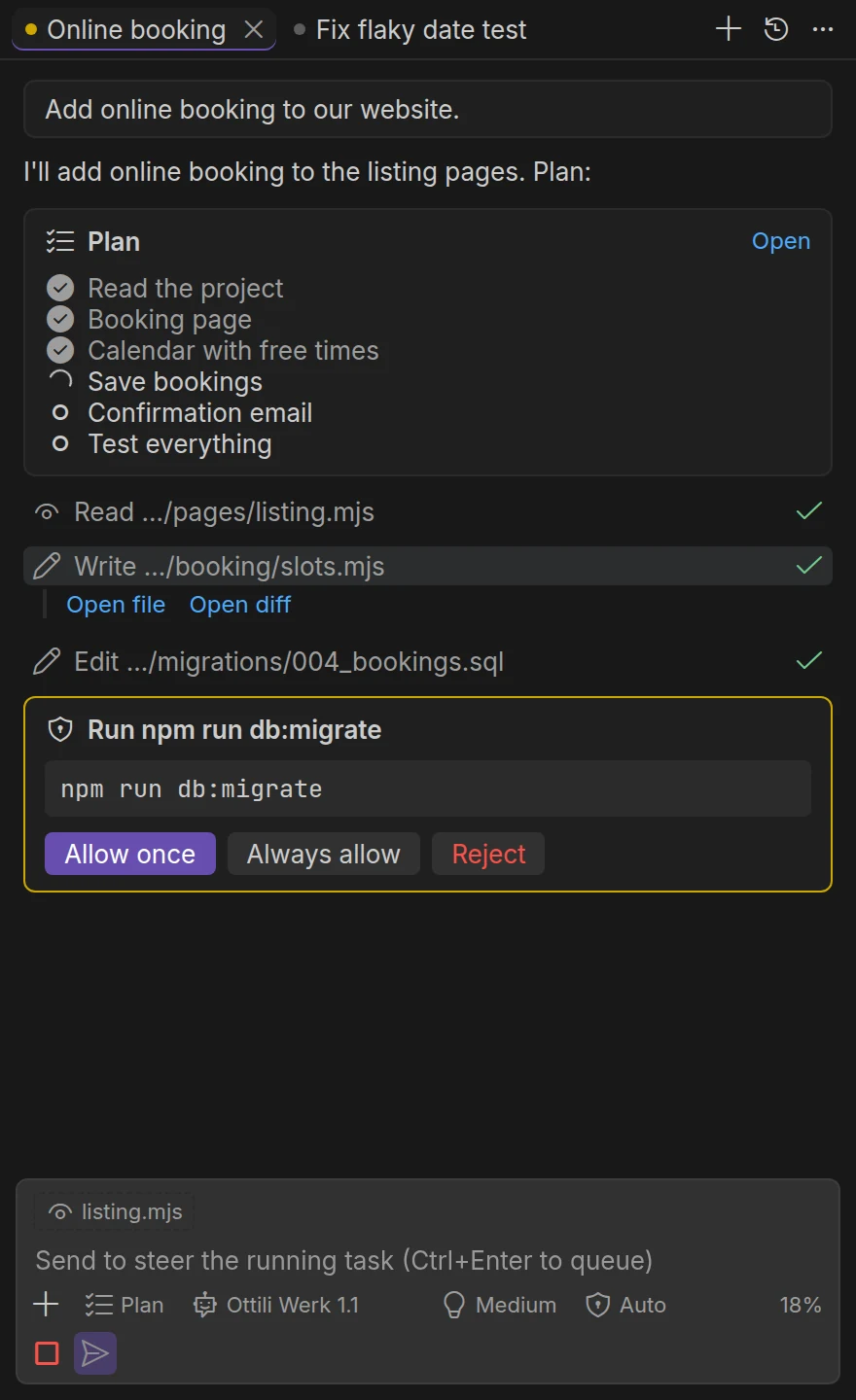
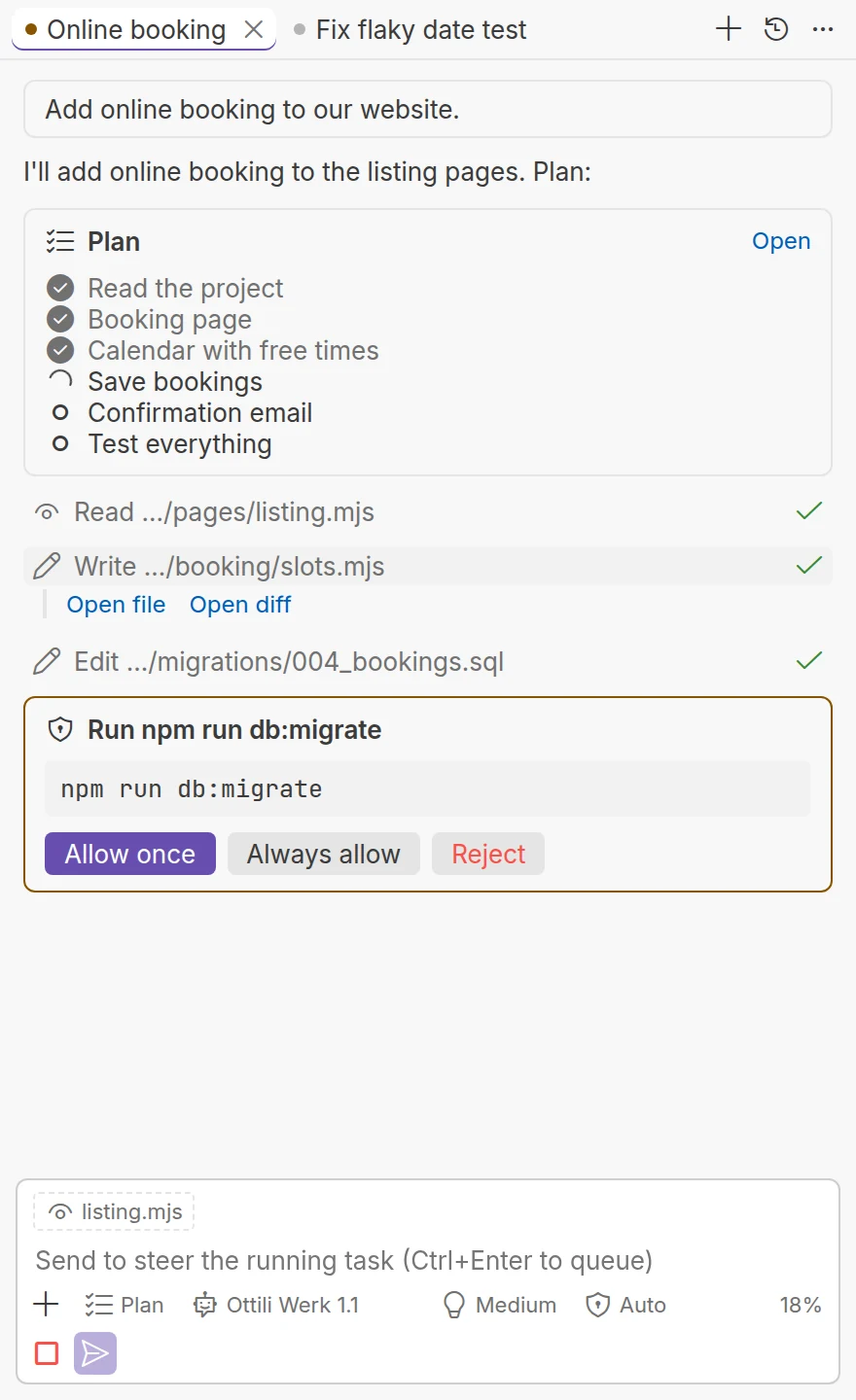
VS Code
Same agent. Right next to your code.
Plans, tool calls and approvals in a chat beside the editor. Every change reviewable, every change reversible.
Install
One line. Then one sentence.
macOS, Linux and WSL. The installer brings its own Node.js if yours doesn’t fit and keeps everything in one folder.
- 1
Install
curl -fsSL https://alran.dev/ install.sh | bash - 2
Sign in
alran auth login - 3
Say what you need
alran "Add online booking to our website."
Prefer npm? npm install -g alran · All ways to install
Fits right in.
Install it with the package manager you use, run it where you already work. Your tools stay. Alran joins them.
- Terminal
 VS Code
 Cursor
 Windsurf
 VSCodium
 Zed
 GitHub
 npm
 pnpm
 Yarn
 Bun
 Node.js
 TypeScript
 MCP
Names and logos belong to their owners and are shown to name compatible tools.
Pick the model per task.
Werk runs on your credit, Claude on your own Anthropic key. The welcome credit covers Werk.
Ottili Werk 1.1
Fast, affordable, built for agents.
- Input
- $0.50
- Output
- $1.50
- Cached input
- $0.03
- Longest answer
- 256K
Claude Sonnet 5.5
Anthropic’s model. Anthropic bills you directly.
- Input
- $2.00
- Output
- $10.00
- Billed by
- Anthropic
Claude Opus 5.5
Anthropic’s larger model, one switch away.
- Input
- $4.00
- Output
- $20.00
- Billed by
- Anthropic
Per one million tokens. Or bring your own provider key: those calls go straight to the provider.
Why switch?
Less per input token
Werk 1.1 costs $0.50 per million input tokens. Claude Sonnet 5.5 lists at $2.
Claude when you need it
Sonnet and Opus run on your own Anthropic key. Werk stays on your credit. Switch per task.
Open, and your keys welcome
The code is on GitHub. Your own provider keys work too.
 Powered by the Ottili AI Platform
Put Werk into your product.
OpenAI-compatible. Point your SDK at the platform and change the model name. That’s it.
import os
from openai import OpenAI

client = OpenAI(
    base_url="https://ai.ottili.one/v1",
    api_key=os.environ["OTTILI_API_KEY"],
)
reply = client.chat.completions.create(
    model="ottili/werk-1.1",
    messages=[{"role": "user", "content": "Summarize this ticket."}],
)
To do · Monday3 / 4
- Fix the flaky date test
- Add online booking
- Answer the customer emails
- Try Alran
One task left.
Start free on the Ottili AI Platform. Then one line in your terminal.
Start free
curl -fsSL https://alran.dev/install.sh | bash